There are three realistic ways to build a mobile app for a Shopify Plus store: develop a custom app on Shopify's APIs, use a DIY Shopify app builder out of the app store, or use a managed app builder designed to turn your existing store into an app.
The right choice is less about technology than it is about your user experience, and what you want your app to be.
How much of your Plus setup does the app need to carry over: your custom checkout, discount logic, international markets, installed apps? And who will maintain it once it launches?
Getting this right is important; because an app can be an amazing sales channel for your brand.
This guide covers what's different about building an app on Shopify Plus, how each of the three routes works and who it suits, a side-by-side comparison, the launch steps, and answers to all the most common questions regarding Shopify Plus and mobile apps.
Does Your Shopify Plus Store Need a Mobile App?
If you’re on Shopify Plus, you should probably have an app.
Mobile apps do the most when you have a lot of customers who buy from you regularly. Customers who install a brand's app tend to buy more often and spend more. They also stick around longer. So the bigger your audience, the stronger the case.
For a Shopify Plus brand, that part is usually a given. If you’re on Plus, you probably have the scale at which an app makes sense.
Mobile apps are a particularly strong fit for:
- Brands with frequent repeat purchases, like beauty, supplements and other replenishment products
- Brands that run drops and launches, where timing matters and a push notification beats an email
- Brands with a loyalty program or VIP tier they want to put front and center
So if one of these categories describes your brand, and you’re on Shopify Plus, it’s a no-brainer.
Even for brands where apps are not the most natural fit, such as those with lower purchase frequency, an app can still make sense when you have the kind of volume where a few percent of your sales could cover the cost of building your app (more on that to come later).
What Makes Building an App Harder on Shopify Plus?
The ironic part is, while Shopify Plus brands are the type that should have a mobile app, actually building an app for these brands is more difficult.
Your store is more custom than a regular store (that’s why you’re on Shopify Plus). Carrying those customizations over to your app is not always easy.
A typical Plus setup includes:
- A customized checkout, with checkout extensions and branding
- Discount and shipping logic built with Shopify Functions
- Several international markets or expansion stores
- B2B pricing and catalogs
- Sometimes a headless storefront, and almost always a long list of installed apps
Some of this carries over. Shopify offers a toolkit called Checkout Kit that shows your normal web checkout inside an app, customizations included, so your checkout work isn't wasted. Most app builders have integrations built for (some of) the apps you use on your store.
But the custom work on your store, the truly custom work, doesn’t. Things like B2B and international storefronts are more complex, and not all app builders are made to support them.
Most tools that help you build an app come with the assumption that you have a typical setup, with the same kind of Shopify features most stores use.
That’s not you.
What Are Your Options for Building a Shopify Plus Mobile App?
In general there are two ways to get an app for your store: build it yourself, or use a tool or service that does it for you.
That could be extended to three, since there are two very different types of Shopify mobile app builder that fit in that second option.
Breaking it down further, you can:
- Build a custom app using your own developers (or an agency) and Shopify’s APIs
- Use a no-code app builder from the Shopify app store
- Use a service that turns your existing Shopify Plus store into a native app
Let’s look at the benefits of each option now.
Should You Build a Custom App With Shopify's APIs?
Build a custom app if you need features no builder or website can give you, and you have the budget and team to maintain it for years.
Here's how it works. Your developers or an agency build the app on Shopify's APIs (application programming interfaces), which are the official programmatic channels the app uses to talk to your store for products, cart, checkout and customer sign-in.
The dev team will either write native code for iOS and Android separately, or use a cross-platform framework like React Native or Flutter that shares one codebase across both.
The costs are real. An ecommerce app typically runs $40,000 to $250,000 or more, with enterprise-grade builds reaching $500,000+. Expect 6 to 18 months to launch, and ongoing maintenance of roughly 15 to 25% of the build cost every year.
The hidden work is what catches teams off guard. Shopify updates its APIs every quarter, Apple and Google update their operating systems every year, and every new feature you add to your website has to be built again for the app. You're effectively running two storefronts forever.
This is rarely worth it for an ecommerce business, where a similar end result can be achieved for a much lower cost and complexity. But if you need a top, top of the line app (and you can afford it), go ahead and build custom.
Is a No-Code Shopify App Builder Enough for a Plus Store?
With this route, you install an app builder from the Shopify app store. It pulls in your products and collections, and you design the app's screens from ready-made blocks and templates.
Enterprise plans for these tools (which you’ll likely need if you’re on Shopify Plus) usually run about $1,000 to $3,000 a month, and some builders also take a small share of in-app sales, and you’ll launch in a matter of weeks.
The trade-offs:
- You're building a second version of your storefront inside the builder, and it's on you to keep it in step with your website
- Your installed apps work only if the builder integrates with them
- Unusual features may not be possible, and moving to another platform later is hard
Picture two stores. A single-market fashion brand with a standard theme can launch a polished builder app quickly and keep it running with the marketing team. A store with B2B pricing and custom product pages may find gaps it can't design around.
This is a good fit for brands with a close-to-standard storefront that want a polished app quickly, run by marketing rather than engineering.
For more custom stores, or a store that wants a higher level of consistency between their website and app, this might not be the strongest approach.
Turning Your Existing Storefront into an App
There’s a third option; which is often the best way for a Shopify Plus brand to launch an app.
A website-to-app service like MobiLoud turns your live storefront into an iOS and Android app. The app is built from your existing mobile storefront and adds native pieces such as a tab bar, push notifications and deep links (links that open a specific page in the app).
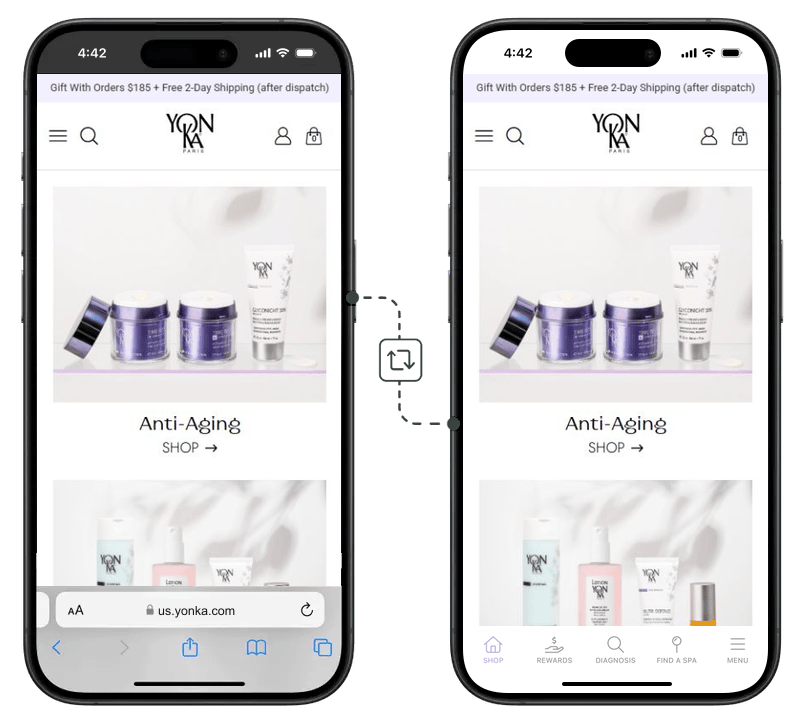
Because the shopping experience comes from your website, your checkout, markets and installed apps come along automatically. There's nothing to rebuild.
You don’t design the app separately, like with most app builders, but you can still make your app unique. You’ll build any custom pages or layouts you want for the app like you do for your Shopify Plus site, and a little bit of code ensures these pages show in the app only.
This is a great way to get a real, full-featured mobile app, without having to rebuild and manage a second storefront.
How Do Custom Apps, App Builders and Website-to-App Compare?
Custom apps cost the most and take the longest but have no limits. Regular app builders are fastest, but only for standard storefronts that fit within their templates. The website-to-app option carries over the most of your existing store, and fit best for custom stores.
Upfront cost
- Custom app: $40K to $500K+
- App builder: Low
- Website-to-app: Usually a one-time setup fee
Ongoing cost
- Custom app: 15-25% of the build per year, plus your team
- App builder: Monthly plan
- Website-to-app: Monthly fee
Time to launch
- Custom app: 6 to 18 months
- App builder: Weeks
- Website-to-app: Weeks
Custom checkout
- Custom app: Yes
- App builder: Yes
- Website-to-app: Yes
Installed storefront apps
- Custom app: Rebuilt one by one
- App builder: Only those the builder supports
- Website-to-app: Yes, as on your site
Who maintains it
- Custom app: Your team or agency
- App builder: The builder, plus your team
- Website-to-app: The service provider
Best for
- Custom app: App-only features plus a mobile team
- App builder: Standard storefronts that want speed
- Website-to-app: Complex storefronts, lean teams
What Are the Steps to Launch a Shopify Plus Mobile App?
Each process might look a little different, but to go live with your own app, you’re generally looking at seven steps, from listing your must-haves to planning for maintenance.
- List your must-haves. Write down your checkout customizations, discount logic, markets, B2B requirements, the apps you can't lose, and how you'll measure success. This list drives every later decision.
- Choose your route. Compare custom, builder and website-to-app against that list. The right answer is whichever covers your must-haves at a cost and maintenance load your team can carry.
- Open the developer accounts in your company's name. Apple charges $99 a year and Google Play $25 once. Registering as a company requires a free D-U-N-S number. Owning the accounts yourself keeps you free to switch vendors later.
- Build and test against your website. Check that every must-have works in the app, including customer sign-in, discounts and each market you sell in.
- Submit to the App Store and Google Play. Apple usually reviews apps within a day. Build in time for a round of fixes if either store raises questions.
- Launch and promote it to existing customers. Site banners, SMS, email and WhatsApp broadcasts, plus app-only perks give people a reason to download. Your app installs will come mostly from customers you already have.
- Plan for maintenance. Operating system updates, Shopify API changes and new features all need attention after launch. Decide who owns this before you ship.
Shopify Plus Mobile App FAQs
Here are a few commonly asked questions when it comes to mobile apps and Shopify Plus.
How long does it take to build a mobile app for Shopify Plus?
Anywhere between two to eight weeks with an app builder or website-to-app service, and 6 to 18 months for a custom build. These are rough estimates, mind you, and each project can look different depending on the complexity and time invested towards it.
How much does a Shopify Plus mobile app cost?
App builders and website-to-app services will usually cost somewhere between $1,000-$3,000 per month, for a Shopify Plus brand. A custom build can be anywhere from $40,000 to $500,000 upfront, plus yearly maintenance of roughly 15 to 25% of that build cost.
Will my Shopify Plus checkout customizations work in the app?
It depends, but most routes can carry your checkout over. With a custom app or a no-code app builder, it depends on what Shopify exposes via API. With a website-to-app service, everything in your checkout carries over, because it’s literally the same checkout.
Will my Shopify apps (reviews, loyalty, subscriptions) work in the app?
It depends on the solution. App builders have integrations for many popular Shopify apps, but not all. A custom build requires custom integrations for each one. A website-to-app service carries everything over, by default; no custom integrations needed.
Do I need my own Apple and Google developer accounts?
Yes (as long as you make this a requirement when choosing the solution). Apple is $99 a year and Google Play is a one-time $25 fee. Owning the accounts protects you if you change vendors, since your app listing, reviews and ratings stay with you.
Which Approach Is Right for Your Store?
Nearly every Shopify Plus store should have their own app. The hard part? Choosing the right way to build it.
Each path can be viable. But the right path will put you in the right position to scale and make your app a powerful asset for your business.
The decision comes down to three lines. Choose a custom build if you need the highest possible performance, and can afford it. Choose a builder if your storefront is close to standard and speed matters most. Choose a website-to-app app builder if your storefront is more custom, and you want everything to carry over to your app.
Whichever direction you lean, start the same way: list your must-haves before you talk to anyone. That list, more than any budget or timeline, tells you which route your store can actually afford to take. Work from there, and start moving on the path to getting your app live.